Upload your game UI designs and instantly extract components, styles, and structure for implementation in your game engine.
Drag & drop your UI design here or click to browse
Supports PNG, JPG, WebP, SVG
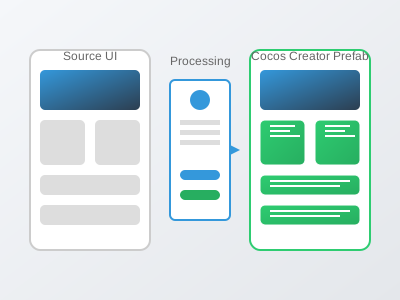
Our streamlined process takes you from design to implementation in minutes
Upload your UI design image, paste a URL, or take a screenshot directly in the tool.
Our AI identifies UI components, extracts styles, and determines the hierarchy.
Review and adjust the detected components, properties, and relationships as needed.
Generate JSON output and assets ready for implementation in your game engine.
Powerful capabilities to streamline your UI implementation workflow
Our AI accurately identifies buttons, panels, text fields, sliders, and other common UI elements from your designs.
Automatically extract colors, fonts, shadows, and other styling properties from your UI design.
Create logical component hierarchies based on visual layout and structural analysis.
Automatically slice and optimize images and icons from your UI design for game implementation.
Fine-tune detected components, properties, and relationships with our intuitive editing tools.
Generate a standardized JSON format that works across multiple game engines for maximum flexibility.
See the analysis tool in action with these example UI designs

See how developers are using our analysis tool to save time and improve quality
SpaceQuest's design team created detailed UI mockups for their mobile game, but the development team was spending weeks manually implementing each screen.
Using our UI Analysis Tool, they were able to automatically extract components, hierarchy, and styling from their design files and generate Cocos Creator prefabs.
Implementation time was reduced from 2-3 weeks to just 1-2 days per screen, with higher accuracy and consistency across the game's UI.
"The UI Analysis Tool has completely transformed our workflow. What used to take our team weeks now takes hours, and the quality is consistently better."

An indie developer had created a complex inventory design for their RPG but lacked the resources to implement it efficiently in Unity.
They used our analysis tool to break down the inventory design into components, extract all assets, and generate a complete Unity prefab structure.
The entire inventory system was implemented in just two days instead of the estimated three weeks, allowing them to focus on gameplay features.
"As a solo developer, I couldn't afford to spend weeks on UI implementation. This tool gave me back precious development time while delivering better results than I could have created manually."
Detailed information about supported formats, capabilities, and limitations
Find answers to common questions about our UI analysis tool
Our AI component detection achieves over 95% accuracy for common UI elements like buttons, panels, text fields, and sliders. For more complex or custom components, our interactive editor allows you to make adjustments to ensure perfect results.
Yes, our batch processing feature allows you to analyze multiple UI screens in one go. This is especially useful for games with many UI screens that share common elements and styles.
Our tool automatically identifies discrete visual elements in your UI design and extracts them as individual image assets. It optimizes these assets for game use, removing unnecessary pixels and generating appropriate formats for your target platform.
Absolutely. After the initial analysis, you can use our interactive editor to adjust component properties, hierarchy, relationships, and naming conventions before generating the final output. You can also save custom presets for future analyses.
Simply sign up for a free trial to access the full UI Analysis Tool. You can immediately start uploading your UI designs and converting them to your preferred game engine format. Our guided workflow will help you through each step of the process.
Start Free TrialJoin thousands of game developers who are saving time and improving quality with our UI Analysis Tool.
No credit card required. Full access to all features during trial.